You're trying to sign into your email, read an article, or open a shared document. A box pops up: "Verify you are human." Below it are a few simple steps. Press the Windows key and R, press Control and V, then press Enter. Easy. You do it without thinking, because you've clicked a thousand "I'm not a robot" boxes before.
Except this time, you just installed malware on your own computer. By hand. And no antivirus stopped you, because as far as your computer was concerned, you gave the order yourself.
The screenshot below is a real example of this scam. It's dressed up as a Google "Verify it's you" sign-in check, the kind of screen you've seen a hundred times:
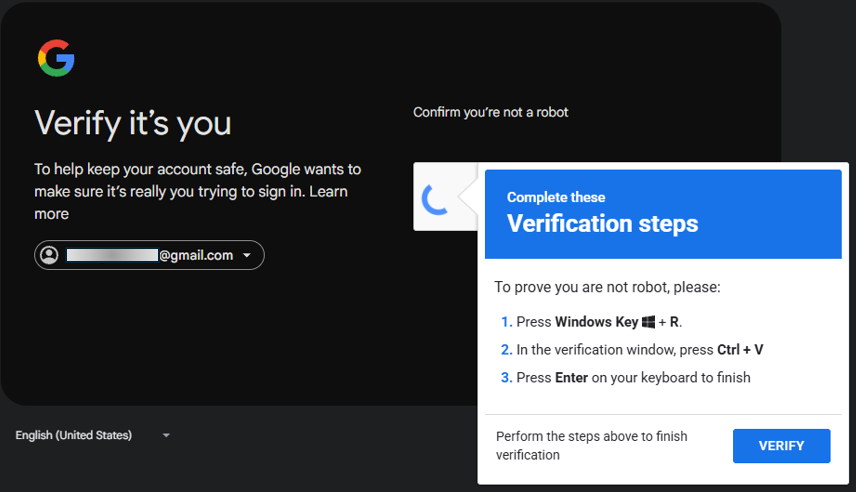
This is "ClickFix," and over the past year it has become one of the most common tricks attackers use to break into ordinary computers. The clever, nasty part is that it never sends you a virus. It convinces you to run one.
What ClickFix Actually Is
ClickFix is a social engineering attack, meaning it targets the person, not the software. Instead of sneaking a malicious file past your defenses, it puts a fake problem in front of you and offers a fake fix. The "fix" is a command you copy and paste into your own computer.
The disguises change constantly, but they follow a pattern:
- A fake "Verify you are human" or CAPTCHA box (the puzzles that normally ask you to click traffic lights)
- A fake login or "Verify it's you" page, like the Google example above
- A fake error message claiming a page, video, or document "failed to load" and needs to be repaired
- A fake browser or software update prompt
- A fake meeting error from something dressed up to look like Zoom, Teams, or Google
Whatever the cover story, the ask is always the same: copy this text, open a system tool, paste, and press Enter.
The Sneaky Trick Hiding in the Clipboard
Here's the mechanics most people never learn. When that fake box tells you to "click here to copy the code," or even just to click a button on the page, the website silently loads a hidden command onto your clipboard in the background. You think you copied a harmless verification code. You actually copied an instruction that tells your computer to go download and run a malicious program.
The steps they walk you through are not random:
- Windows key plus R opens the Run box, a built-in shortcut that runs commands instantly.
- Control plus V pastes the hidden command they slipped onto your clipboard.
- Enter executes it.
In three keystrokes, you've told Windows to fetch malware from the internet and launch it. On a Mac, the same scam points you to the Terminal app instead. Either way, you are doing the work the attacker can't do from the outside.
Why Antivirus Doesn't Save You
This is the question that catches people off guard: how does this get past security software?
It gets past it because there's almost nothing for security software to catch. No malicious email attachment. No sketchy download the browser can block. No file at all, at first. The only thing that happens is that a person opens a legitimate, trusted Windows tool and types a command. Antivirus is built to stop suspicious programs from running without your say-so. ClickFix flips that on its head by getting your say-so. You become the one who clicks "yes."
Once the command runs, what lands on your machine is usually an information stealer (a program that quietly harvests your saved passwords, browser logins, and banking sessions) or a remote-access tool that hands a stranger the keys to your computer. For a small business or a home office, that can mean drained accounts, stolen client data, or a ransomware demand a few days later.
The One Rule That Stops It Cold
You do not need to be technical to be immune to this attack. You just need one rule, and it is absolute:
A real website will never ask you to open the Run box, PowerShell, or Terminal and paste in a command.
Proving you're human means clicking a checkbox or picking out a few pictures. It never, ever involves pressing Windows key plus R or running anything. Signing into Google does not require it. Loading a video does not require it. Opening a document does not require it. There is no legitimate situation, none, where a web page needs you to paste a command into a system tool to continue.
So if a page ever gives you those instructions, you already have your answer: close the tab. You don't need to figure out whether it's real. The request itself is the proof that it isn't.
Protecting Yourself and Your Team
- Make the rule a household and team rule. Tell everyone who touches a computer: no web page ever needs you to open the Run box or paste a command. Saying it out loud once turns a whole office, or a whole family, into people who recognize the trap.
- Never paste something you don't remember copying. If your clipboard has a command in it and you didn't knowingly copy it, that's a red flag on its own.
- Slow down on "do these steps to continue." Urgency and step-by-step instructions are the hallmarks of this scam. A normal error message doesn't hand you a keyboard shortcut to run.
- Use a standard, non-administrator account for everyday work. It won't stop every variant, but it raises the bar for what malware can quietly install.
- Keep backups and turn on Multi-Factor Authentication (MFA) on your important accounts, so that if something does slip through, the damage is contained.
Don't Outsmart It. Just Recognize It.
ClickFix works because it borrows the look of something you've safely clicked a thousand times, a Google sign-in, a CAPTCHA, a video player, and adds one step you've never questioned. The defense isn't technical skill. It's recognizing that the step itself, "paste this and press Enter," is something no honest website would ever ask of you.
Scams like this thrive in the half-second between "this looks normal" and "wait, why is it asking me to do that?" Training your instincts to pause at that exact moment is what protects you, and it helps to have someone to ask when you're not sure.
For a business, we offer a one-time review of the things that decide how badly a single bad click could hurt you: your account protections and Multi-Factor Authentication (MFA), who holds administrator access, whether your backups actually work, and how your network and access are set up. You get a prioritized findings report you can act on.
Working from home, or just want your personal setup looked at? We can review home and home-office computers too: your devices, accounts, and everyday safety habits, explained in clear terms so a scam like this has nowhere to land.
And for the moment you're staring at a strange pop-up or an unexpected "do these steps" message, we give you a real person to ask, and a straight answer.
Not sure where you stand? Book a free 15-minute call → We serve small businesses, home offices, and individuals throughout Marion County, FL.